
.svg)

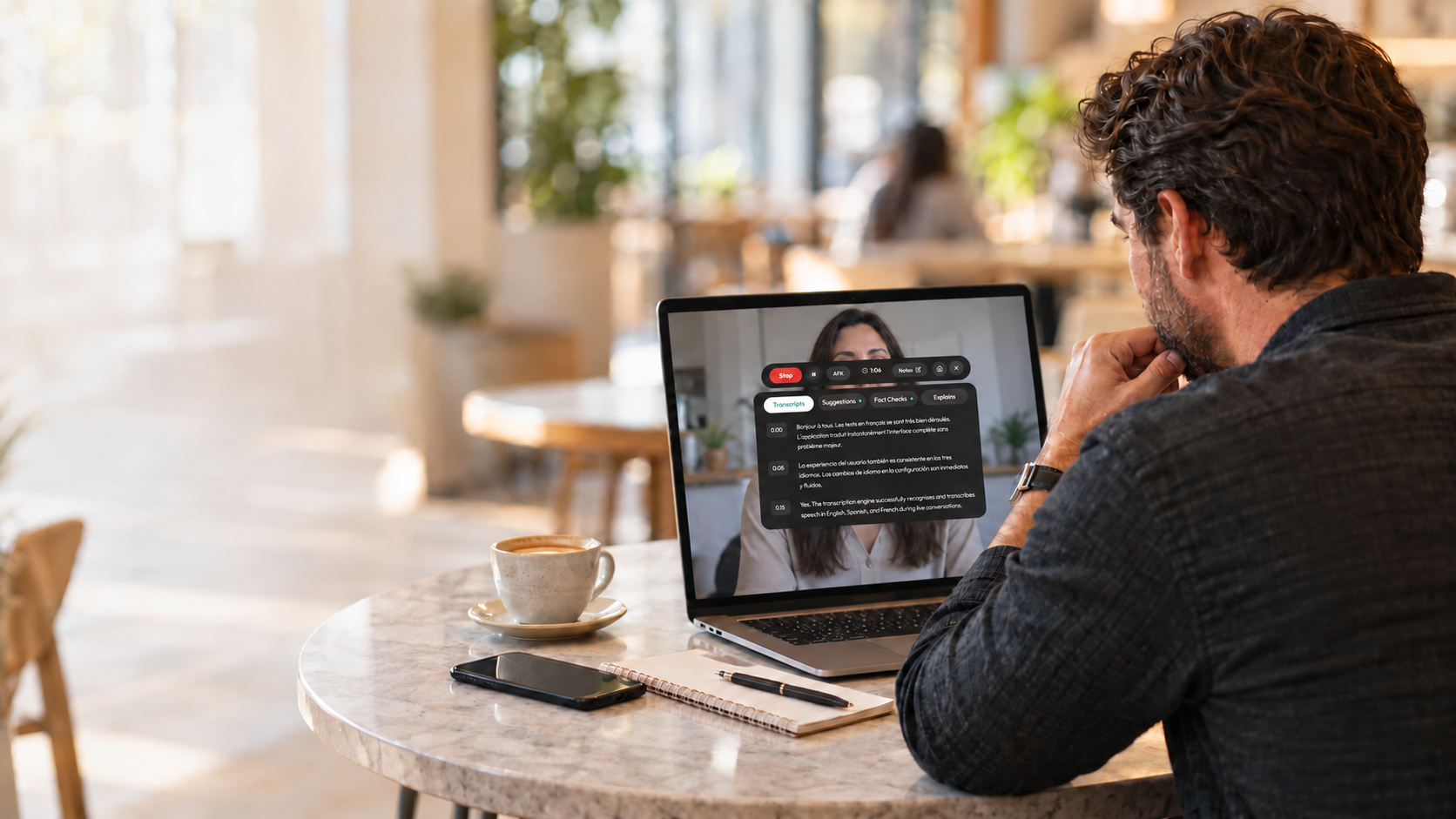
Your clients don't want another attendee popping into their call. Neither do you. Bot-based meeting assistants can feel intrusive during sensitive client conversations, and they often create awkward moments when someone asks, "Who just joined?" Modus gives you a different approach: an AI meeting assistant that listens in real time without ever joining as a participant.
Field sales teams running back-to-back client calls need tools that capture every detail without disrupting the conversation. This guide breaks down the best bot-free AI meeting assistants designed specifically for fast-paced client interactions, with a focus on mobile usability, privacy, and actionable note capture.
Field sales teams face different challenges than internal meeting-heavy roles. You're often on the move, jumping between prospect calls and client check-ins, sometimes from your phone in a parking lot before walking into a building. The AI meeting assistant that works for an all-day Zoom marathon won't necessarily work for your workflow.
Modus takes a different approach to meeting intelligence. Instead of recording your calls and processing them afterward, Modus listens in real time and delivers proactive suggestions while you're still talking. For field sales teams, this means getting prompted with relevant talking points, fact-checks on claims made during the conversation, and quiet nudges that help you steer the discussion toward a close.
The platform works without joining your call as a participant. Your client sees only you on the call, with no awkward bot intruding on a sensitive pricing discussion or contract negotiation. When the meeting ends, Modus delivers a clean summary with notes, action items, and key takeaways ready for your CRM update or follow-up email.
Modus also includes an AFK Mode that keeps listening if you need to step away briefly during a longer call. You can catch up on what you missed and rejoin the conversation naturally. This feature alone saves field reps from the embarrassment of asking, "Sorry, can you repeat that?" after checking a quick text.
Pros:
Cons:
Granola positions itself as an AI notepad that enhances your own notes with transcription data. You type rough notes during the call, and Granola fills in the gaps using the meeting audio. This hybrid approach appeals to people who like taking notes but want AI backup for the details they miss.
The platform captures audio from your device without joining as a meeting participant. After the call, Granola produces structured summaries organized by topic, with templates you can customize for different meeting types like discovery calls or quarterly business reviews.
Pros:
Cons:
Fathom records video meetings and produces transcripts, highlights, and summaries after the call ends. The platform integrates with CRM systems to push meeting notes directly into contact records, which saves time on manual data entry after client calls.
While Fathom does offer a bot that can join meetings, some users report using the platform's upload and alternative capture options for more discreet recording. The AI-generated summaries include action items and key moments tagged for easy review.
Pros:
Cons:
Fireflies.ai offers a Chrome extension that records meetings directly from your browser tab without a bot joining the call. This approach works for Zoom, Google Meet, and Teams sessions accessed through the web browser, capturing audio and generating AI-powered notes afterward.
The platform includes searchable transcripts, AI summaries, and integrations with productivity tools. For teams already using Fireflies' broader ecosystem, the Chrome extension offers a less intrusive recording option compared to the standard bot.
Pros:
Cons:
Otter.ai supports both direct device recording and a meeting assistant that joins calls. For users who want bot-free capture, the device recording option transcribes audio from your computer without adding a visible participant. The platform produces real-time transcripts and searchable notes.
The hybrid approach gives teams flexibility—use the bot for internal meetings where visibility is acceptable, and switch to device recording for client calls where discretion matters more.
Pros:
Cons:
Cluely brands itself as an "invisible AI" that runs in the background during calls. Beyond transcription and summaries, Cluely offers a live Q&A feature where you can ask questions during the meeting and get AI-generated answers based on context. This positions it as an in-meeting research assistant rather than just a note-taker.
The platform targets students, job seekers, and knowledge workers who want real-time support during conversations. For sales professionals, the live answer capability could help with quick product lookups or competitive information during discovery calls.
Pros:
Cons:
Jamie captures audio from your Mac or Windows device and turns it into meeting notes, action items, and transcripts. The platform works across any meeting platform since it records at the device level rather than integrating with specific video conferencing tools.
After each meeting, Jamie produces structured summaries with speaker identification. You can tag meetings by project or client for easy organization, and the platform includes an AI chat feature for querying past meeting content.
Pros:
Cons:
Choosing the right AI meeting assistant depends on how you actually work. Field sales teams need different capabilities than someone who sits in internal meetings all day. Here are the questions that matter most:
First, consider when you need the AI to help. Post-meeting summaries are useful, but they don't help you handle an objection or remember a product spec while you're still on the call. If your conversations move fast and stakes are high, look for tools that offer real-time support.
Second, think about where your meetings happen. If you're frequently taking calls from your phone between appointments, a desktop-only tool won't fit your workflow. Modus delivers real-time listening and guidance through its mobile app, which matters for field reps who aren't always at their desk.
Third, evaluate the privacy implications. Client conversations often include confidential information. Understand where the audio goes, how long it's stored, and whether the vendor uses your data for AI training. For regulated industries like healthcare technology or financial services, these details can determine whether a tool is even an option.
Privacy-conscious clients often ask about recording before sharing sensitive information. Bot-free assistants give you more flexibility in how you approach this conversation. Instead of explaining why a bot named "Notetaker" just joined the call, you can simply mention that you'll be taking notes during the discussion.
The technical distinction matters too. Bot-free tools typically capture audio at the device level rather than through the meeting platform's API. This means the meeting platform itself doesn't flag the call as recorded, which avoids triggering automatic notifications that might concern privacy-sensitive clients.
Modus processes meeting data with privacy as a core design principle. The platform focuses on delivering real-time value during the conversation while producing clean summaries afterward, without the data handling concerns that come with cloud-based bot recording.
Most AI meeting assistants treat the meeting as raw material for post-processing. They record, transcribe, and summarize: useful for documentation, but not much help when you're in the middle of a challenging negotiation or trying to remember a key product detail.
Modus flips this model. The platform listens in real time and delivers proactive suggestions while the conversation is happening. For field sales teams, this means getting fact-checks, talking point reminders, and contextual prompts exactly when they matter most, during the call itself.
The bot-free architecture keeps your client interactions clean and professional. No awkward bot join notifications, no extra attendee in the participant list, just you and your client having a natural conversation while Modus works quietly in the background. When the call ends, you get a clean summary ready for your CRM update or follow-up email.
Modus also brings this capability to mobile through the Modus Mobile App, which means field reps can capture and get real-time guidance even when taking calls away from their desk. Combined with features like AFK Mode for longer meetings and one-click fact-checking for credibility, Modus delivers capabilities that post-meeting summarizers simply can't match.
Download Modus free and experience the difference real-time AI meeting assistance makes for your client calls.
FAQs about bot-free AI meeting assistants for client calls
A bot-free AI meeting assistant captures meeting audio directly from your device rather than joining the call as a visible participant. Your clients and colleagues only see you in the meeting: no extra attendee shows up in the participant list. Modus operates this way, listening in real time and delivering suggestions during the call without disrupting the conversation.
Client calls require a professional atmosphere where the focus stays on the conversation. Having a bot join mid-call can raise questions, break the flow, and sometimes trigger privacy concerns. Modus keeps things simple: you get AI-powered assistance for fact-checking and note capture without any visible technology intruding on your client relationship.
Some can. Modus offers a mobile app that delivers real-time listening and guidance for conversations on the go. This matters for field sales professionals who often take calls between appointments or from locations away from their desk. Not all bot-free tools have this capability, so check mobile support before committing to a platform.
Bot-free assistants capture audio at the device level and process it through AI to produce transcripts and summaries. Modus goes further by delivering real-time transcription, suggestions, and fact-checks during the call, not just documentation after it ends. This approach helps you respond more effectively while the conversation is still happening.
Compliance depends on the specific tool and how it handles data. Look for platforms that explain their data processing practices, storage locations, and retention policies. For industries with strict requirements like healthcare or financial services, verify that the tool meets your organization's specific compliance needs before deployment.


Contact us today to learn how modus can be configured for your specific industry and needs.
.png)

%20(1).png)
.png)