Everything you need for Confident Conversations

Watch how Modus supports you in real time with live transcription, instant fact-checks, and quiet prompts - so meetings stay clear and stress-free.

Home
How It Works

Core Tools

Live Transcription (Closed-Caption Style)

On-screen captions track every word in real time - no audio recording.

Stay in the flow with real-time captions you can open or close anytime. Scroll back to review past lines instantly, or follow along live if you miss a word. Your transcript stays intact and ready whenever you need it.
  • Instant Captions: Every word tracked on screen in real time - no audio recording.
  • Easy Navigation: Scroll up or down to revisit past conversation points
  • Pop-Up Control: Open or close the caption panel anytime - your transcript remains saved.
Interface showing live captions with the text 'Sarah: Let's discuss the project timeline,' indicating on-screen captions track every word in real time with no audio recording.

In-Conversation Cue Cards

Get timely cue cards with smart questions and reminders.

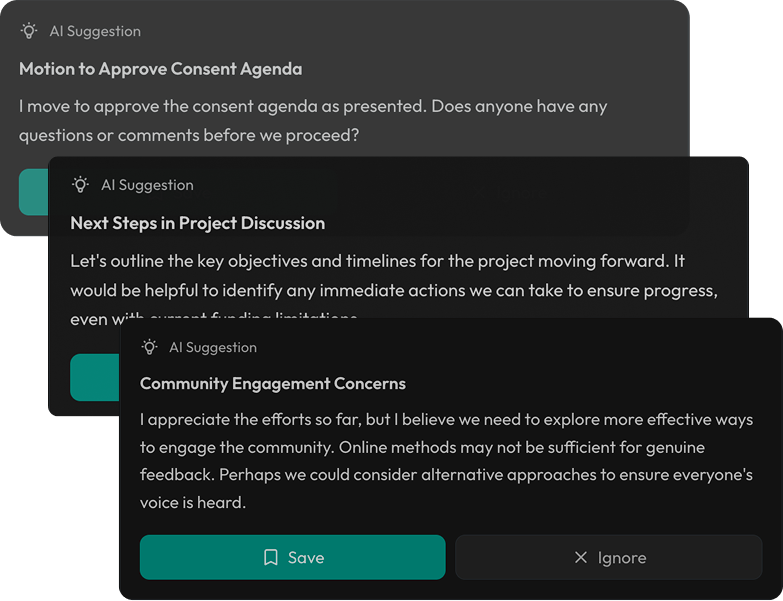
Cue cards appear in real time as you speak—surfacing suggestions, clarifications, or follow-ups shaped by the flow of the conversation. They help you ask sharper questions and catch details you might otherwise miss.
  • Context-Aware: Cards adjust dynamically to what’s being said, not pre-set scripts.
  • Discreet Support: Subtle pop-ups keep you on track without interrupting the flow.
  • Action-Oriented: Suggestions focus on next steps, clarifications, or deeper questions.
  • Save or Dismiss: Keep valuable cue cards for later reference, or dismiss irrelevant ones instantly.
  • Adaptive Learning: The more you use Modus, the more precise and relevant the cards become.
AI suggestion box advising to clarify timeline expectations, recommending specific milestones and deadlines, with options to Save or Ignore.Smart Que Cards interface showing AI suggestions categorized by urgency levels with a 6-second timer, context, and real-time updates.

Real-Time Fact Checking

Quickly verify what’s said or unpack complex terms—right in the flow of conversation.

With one click, fact-check what was just said. Modus instantly verifies the statement and shows a confidence level—so you can decide whether to trust, clarify, or correct in the moment
  • One-Click Check: Instantly verify a statement without breaking the flow
  • Confidence Levels: Each result comes with a certainty score for quick judgment.
  • Citations Provided: See exactly where the information came from.
  • In Your Control: Accept or dismiss fact-checks with a single action.
  • Conversation Anchored: Checks link back to the exact moment in context.
Fact Check Mode interface showing a statement 'We increased sales by 45% last quarter' marked as false with 88% confidence; actual growth was 28%.

Explain Mode

Clarity with a click

Click Explain to instantly get a plain-language breakdown of what was just said. Perfect for moments when you missed a detail or need extra clarity without interrupting the flow. It’s like elevating a point in real time—quiet support that keeps meetings moving smoothly.
  • Instant Clarity: Simplifies complex terms or ideas on demand
  • In-Flow Support: Explains without stopping or derailing the conversation.
  • Context Anchored: Always tied back to the exact moment you clicked.
Screenshot of a chat about implementing RBAC, with a button labeled 'Explain' and a panel defining RBAC as Role-Based Access Control, a security method assigning permissions by user roles.

Privacy & Security

Your conversations stay private — Modus doesn’t record or store data.

Data is encrypted in transit and at rest, gated by granular access controls, with auditability built in.
  • Nothing saved beyond what you choose to allow.
  • Data is encrypted in transit and at rest.
  • Built with basic access controls to keep you in charge.
Privacy assurance with icons showing no recording, local only storage, and no data storage, stating Modus doesn't record or store data.
How it works

Real-time clarity during the session. Smart outcomes after it ends.

Start a Session

Launch Modus anytime you need support meetings, interviews, lectures, doctor visits.

Add Context (Optional)

Upload notes, agendas, PDFs, or set a session goal.Modus stays focused so you don’t drift.

Tap to Assist

While the conversation happens, use:
- Suggestions (better responses + follow-up questions)
- Transcript (live language support)
- Fact-check (verify statements instantly)
- Explain (simplify tough terms)

Get Your Summary

After the session, Modus creates:
Overview • Key Points • Action Items • Participants • Sentiment • Transcript

Save, Search, Share

Find past sessions instantly and share summaries with recipients in one click.

How Modus Stands Apart

Most tools act like a meeting attendee. Modus acts like your companion.
Not a bot. A companion
Feature
Traditional Meeting Tools
Modus
How it shows up
Joins meetings as a bot participant
Works as a private layer, no bot presence
Experience
Can feel invasive or distracting
Invisible support - just for you
When it helps
Mostly after the meeting
During + after the meeting
Main focus
Recording + transcription + summary
Real-time guidance + clarity
Live suggestions
Rare or minimal
✅ Yes - instant suggestions
Fact-checking
Usually not included
✅ One-tap fact-check with sources
Explain mode
Not included
✅ Explain complex terms instantly
Highlights
Basic markers
✅ Smart highlights you can save
Context support
Limited
✅ Upload files + Add Context
Privacy approach
Often records raw audio/video
✅ No raw recordings stored
Sharing
Often team-based exports
✅ Share your summary in one click
Who it’s built for
Teams + meeting owners
Individuals + teams (personal-first)

Basic plan

$96/year
Basic features for up to 10 users with everything you need.
Get started

Business plan

$192/year
Advanced features and reporting, better workflows and automation.
Get started

Enterprise plan

$384/year
Personalised service and enterprise security for large teams.
Get started
User access
Basic features
Saved reports
10
20
Unlimited
Individual data
20GB
40GB
Unlimited
Support
Automated workflows
200+ integrations
Reporting and analytics
Analytics
Basic
Advanced
Advanced
Export reports
Scheduled reports
API access
Advanced reports
Saved reports
Customer properties
Custom fields
User access
SSO/SAML authentication
Advanced permissions
Audit log
Data history
Most tools summarize your meeting. Modus improves your meeting - in real time.

Training & Support

New tools should make life easier, not harder. We guide you through onboarding and training so Modus feels natural from day one, and your team feels confident using it.

Frequently Asked Questions

Everything you need to know about the modus

Icon Help
Can Modus fact-check during a meeting?
Icon ArrowIcon Arrow
Icon Help
Is Modus secure for sensitive conversations?
Icon ArrowIcon Arrow
Icon Help
Does Modus record or store conversations?
Icon ArrowIcon Arrow
Icon Help
Do I need training to use Modus?
Icon ArrowIcon Arrow

Try modus with your next meeting

Sign up a workspace, invite teammates, and see real-time prompts in action.